
Summary
Looks like moving the user’s TCC db to /private/var/containers/Data/ProtectedSystem/[UUID]/Data/Library/Application Support/com.apple.TCC/ was not the only change in the whole privacy castle macOS 27. (What btw was a great move as now attackers with full disk access permissions can’t modify your privacy settings)
macOS 27 quietly ships a new privacy mechanism I hadn’t seen documented anywhere: it extends the com.apple.macl protection that has always guarded sandboxed apps’ ~/Library/Containers/<bundle-id>/Data folders to a hand-picked set of non-sandboxed apps’ ~/Library/Application Support/<name> folders too. I noticed it by accident — Firefox’s profile folder was suddenly inaccessible from Terminal, while MacPass, a password manager sitting right next to it, was wide open. That asymmetry didn’t sit well with me, so I pulled the thread. It ends in a hardcoded app allowlist baked into /usr/libexec/sandboxd (thx @ciphwall for the hint), meant to be updated live via XProtect.
Update 2026-07-19
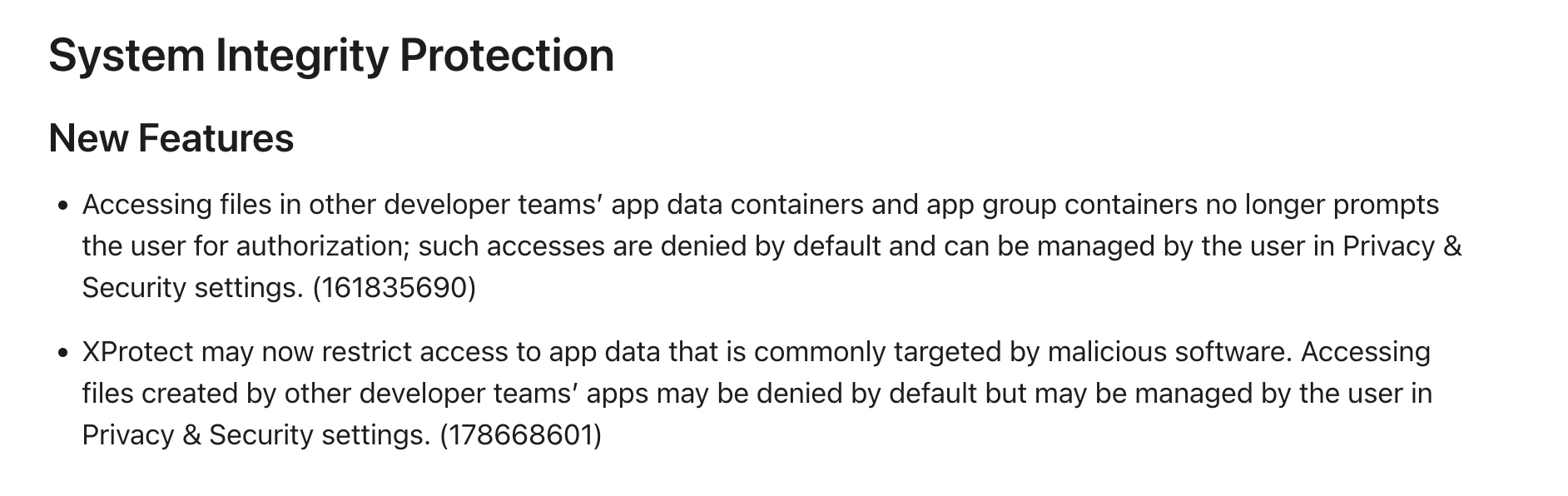
macOS 27 Beta update mentions the change. Thx Thijs for sending me this.
This is a short walk through what actually changed.
The xattr
Listing my ~/Library/Application Support from a plain Terminal (no Full Disk Access), some folders suddenly returned Operation not permitted while others were fine:
$ ls ~/Library/Application\ Support/Firefox
ls: .../Firefox: Operation not permitted

$ ls ~/Library/Application\ Support/MacPass
$ <list of files>
Neither app is sandboxed. The difference is a com.apple.macl xattr sitting on the protected folder — the exact mechanism macOS uses to bind a Container to an app’s code identity, now pointed at plain Application Support folders.
Where the decision lives: sandboxd
/usr/libexec/sandboxd carries an embedded XML policy (sandboxd.AppProtectionRule, version defaultRules-2) that maps a bundle id + Team ID to the paths that should be protected:
<dict>
  <key>attribution</key><string>zksnacks.wasabiwallet</string>
  <key>paths</key>
  <array><string>~/.walletwasabi</string></array>
  <key>allowedTeamId</key><string>L233B2JQ68</string>
  <key>enforce</key><true/>
</dict>
The full list
You can pull the whole thing straight out of the binary:
$ strings /usr/libexec/sandboxd | grep -iE '~/(Library/Application Support|\.wallet)'
Protected paths in this first wave (defaultRules-2):
| App | attribution | Team ID | Protected path |
|---|---|---|---|
| Discord | com.hnc.Discord | 53Q6R32WPB | ~/Library/Application Support/discord |
| Google Chrome | com.google.Chrome | EQHXZ8M8AV | ~/Library/Application Support/Google/Chrome |
| Brave | com.brave.Browser | KL8N8XSYF4 | ~/Library/Application Support/BraveSoftware/Brave-Browser |
| Microsoft Edge | com.microsoft.edgemac | UBF8T346G9 | ~/Library/Application Support/Microsoft Edge |
| Firefox | org.mozilla.firefox | 43AQ936H96 | ~/Library/Application Support/Firefox |
| Ledger Live | com.ledger.live | X6LFS5BQKN | ~/Library/Application Support/Ledger Live |
| Exodus | com.electron.exodus | VK5Q293EVL | ~/Library/Application Support/Exodus |
| Wasabi | zksnacks.wasabiwallet | L233B2JQ68 | ~/.walletwasabi |
And the paths explicitly excluded from protection, so browser-extension native messaging hosts keep working:
~/Library/Application Support/BraveSoftware/Brave-Browser/NativeMessagingHosts
~/Library/Application Support/Google/Chrome/NativeMessagingHosts
~/Library/Application Support/Microsoft Edge/NativeMessagingHosts
~/Library/Application Support/Mozilla/NativeMessagingHosts
Discord, the major browsers, and a few crypto wallets. Everything else — including password managers like MacPass — is simply not on the list. And the real punchline is this hardcoded path:
/Library/Apple/System/Library/CoreServices/XProtect.bundle/Contents/Resources/AppProtectionRules.plist
The list baked into sandboxd is just a fallback. The live version is meant to ship through XProtect, so Apple can extend this protection to new apps without an OS update.
Proof: writing into a protected path
Wasabi wasn’t even installed on my test VM, yet its path is already protected:
tester@VM % echo "123" > ~/.walletwasabi
zsh: operation not permitted: /Users/tester/.walletwasabi
(echo "123" > ~/.walletwasabiAAAA worked)
The kernel MACL blocks the write outright. Interestingly, sandboxd also logged:
Error Domain=kTCCErrorDomain Code=9 "server error:
kTCCServiceSystemPolicyAppDataDetailed access requires indirect object have an
associated app bundle"
This is interesting as I don’t have Wasabi wallet even installed on my machine :-) Looks like the new kTCCServiceSystemPolicyAppDataDetailed protects files/directories even if they are not yet created.
Proof 2:
ls ~/Library/Application Support/Google/Chrome
ls: .: Operation not permitted
but listing NativeMessagingHosts (which is a subdirectory) works normally:
ls ~/Library/Application Support/Google/Chrome/NativeMessagingHosts